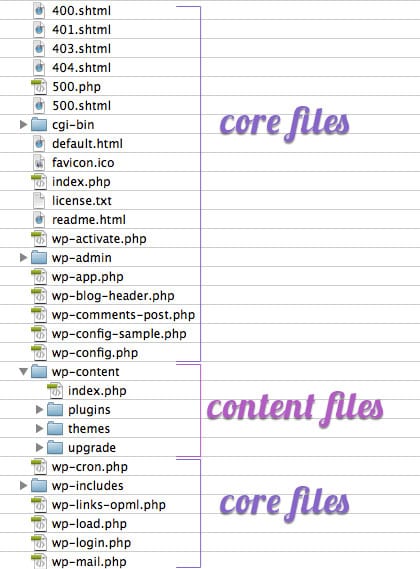
Core WordPress Files viewed in FTP program
I joined Sucuri a little over a month ago. My job is actually as a Social Media Specialist, but we have this process where regardless of your job you have to learn what website infections look like and more importantly, how to clean them. It’s this idea that regardless of you are you must always know the foundation that makes this company work. After a month of this training, I made some very interesting observations through my interactions with some of our clients and felt some might find it interesting. This might be new to some, and not so new to others, but for me it was fascinating and worth a share.
I will note that I was like many of you a month ago, I operated my own website, and still do, and came to know of Sucuri because my own website had been hacked. Such is the circle of life that I now work at this fascinating place. Here are some of my observations and I hope they help someone.
It is important to understand that whenever you create a website, even before you actually register your domain name, one thing should be at the top of your list: create a good password. Our friends at WPEngine put together a fascinating post unmasking the psychology behind passwords, if you have time, give it a once over. On that note, always use correctly generated passwords. Where?
Short answer: everywhere passwords are required.
Longer explanation:
Remember, employ Complex Long and Unique passwords at all time, do not use the same password across all your online profiles and most important, if you’ve been infected and you get help getting it clean, update all passwords the minute it’s done.
One of the biggest contributing factors to reinfections are shared environments. We’re not talking to shared versus dedicated hosting, instead accounts in which have multiple installations within them. Imagine a hosting account in which you install 10, 20, maybe 100 different CMS applications. These are considered soup kitchen servers, and they are ripe to be exploited.
What often happens is we forget what we’ve installed and in the process leave the sites to their own demise. Over time, they become out of date and some, unfortunately, fall susceptible to a weakness like a vulnerability. As are the things on the web, at some point one of those weaknesses is identified via the relentless bots crawling the web. Once identified, they get exploited. Once in the environment, via a method we call lead frogging (also known as cross-site contamination) they infect all neighboring sites, inevitably affecting your good website.
Where this plays a role is that often a website owner will clean the good website, assuming that is where the weakness is. Only to find out, after much troubleshooting that the weakness is actually in a neighboring site – leading to continuous reinfection cases.
Lesson?
Stop operating soup kitchen servers, if one website is infected on the server, assume they all are and get them all cleaned. If you can’t, then it might be time to do some spring cleaning.
If you’re thinking that your website is just a personal blog, school project, presentation website or small business services, and by definition that is not a target for hackers, you are wrong. I encourage you to read our recent post on Why Website Get Hacked as it’ll help provide perspective.
Most attacks are not targeted attacks. You’re just a part of a script being targeted upon a large number of websites and servers, where the hackers are looking to find vulnerabilities and they’ll strike. Most of the times this is done with automated tools. They can find and infect your website in minutes.
Being hosted on the server where a targeted website is also hosted will cause problems to all websites hosted there, if the server is not correctly patched and secured/hardened.
I can think of one case where I imagined the client having gone through this process:
Now, we already see three possible problems due to the different types of platforms being used. The time and effort required to maintain this type of configuration is very time consuming, be sure to account for this when deploying your configuration.
It’s easy if you’re not very technical, to lose track of which files belong where, which CMS is up-to-date and which isn’t. Not all CMS applications are treated equal.
To avoid the mess above, start by learning the structure and names of the core files that come with the CMS of your choice.
What does the original archive downloaded from the platforms website contain? Visualize the files, their names and extensions.
Let’s look at WordPress for instance, we all love and use it, right? This is what a clean WordPress install folder looks like, when seen via my FTP client:
Core WordPress Files viewed in FTP program
The wp-config.php file contains the information enabling WordPress to connect to the server and the database to store content and data. Attackers will create additional files or folders in your website, having similar names as the clean WordPress files. So paying attention to them will help you determine which files could potentially have been added by the intruder. Remember, wp-config.php is not the same as wp-configs.exe or config-wp.php.
Never feel inadequate or inferior for not knowing your way around a server or website dashboard. Always ask for professional help if you need it, contrary to popular belief, website security is not a Do It Yourself (DIY) project.
Never store backups in the publicly accessible folder. Never have backups on the same physical location as the main website. Something will always happen and both the website and the backups folder you rely on could be deleted.
Make sure you are securely saving your website data on protected backup services, which will allow for easy data-retrieval in the event of an attack. There are many services available, we have one for existing clients, but you can find a number of them on the market. The biggest mistake we see are website owners never employing a backup service, when an infection is so bad that the attacker deletes existing code, it’s impossible to recover without a good backup.
I hope these 6 tips help someone, they may feel foreign, but don’t worry, there is plenty of help available. Remember, there is no such thing as a 100% security solution. The difference is like getting sick and visiting the doctor. You can follow the prescribed treatment and take the pills, or say, “I don’t care about what this doctor thinks” and continue to get sick again and again.
The same thing happens to websites. Untreated, uncleaned, not “medicated” correctly, can lead to the same problems reappearing. So be on the safe side, learn about your mistakes, correct your security habits, keep your system updated, use correctly configured security services and you’ll reduce your overall risk, helping you avoid becoming a recurring victim.